Making backups is necessary for every host and of databases. We want to describe how to make a backup from your host database by using phpmyadmin.
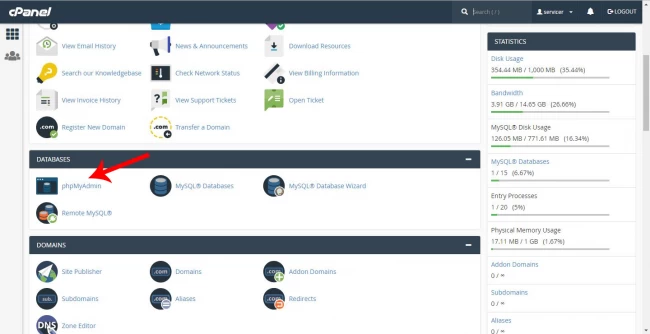
- Login to Cpanel and find “databases” section. Click on “Phpmyadmin”.
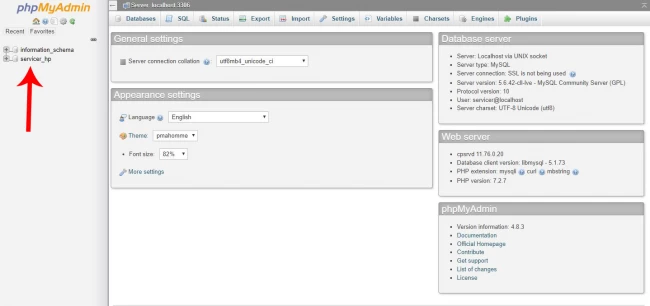
- After opening, you will see all of your databases on the left side of the window. Click on the database that you wish to make a backup and click “export” tab.
- In export tab, you can see the options of export. Quick mode starts making the backup without any option but in custom mode you can choose more options. Recommend to use custom mode to the people who are more acquaint with Phpmyadmin. The last section is about selecting the format of backup. Choose from the drop down list to select the export file extension.
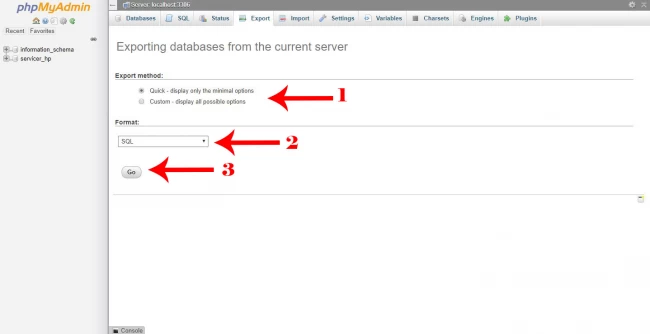
- Click on “Go”. Congratulation! The backup file is ready.